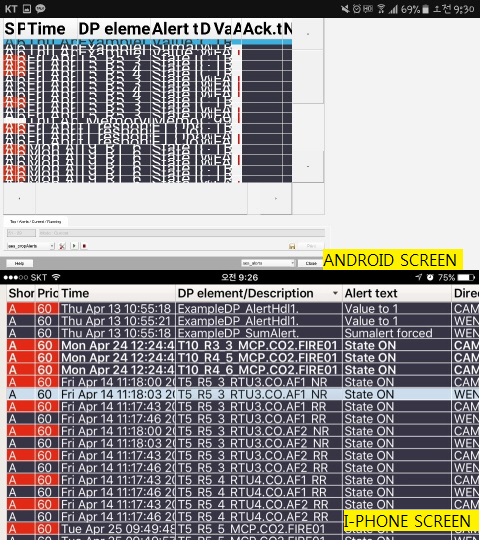
Re: How to fit the alarm font size in mobile application
Postby interelec »
Thank you for your answer.
But I have a question.
Only android phone displays a big font.
In addition, when I reduce font size in android phone, I see a small size font in PC.
But i-phone always displays a fit font. (Even if you don't change or change the font size)
How can I fit the font size into mobile alarm screen in android phone?
This android phone model is samsung galaxy S7 and iphone model is iphone 6 plus.
Re: How to fit the alarm font size in mobile application
Postby mkoller »
The reason is the different resolution (better say: DPI) of the devices.
I think all you can do is to adjust the font on opening via script and decide based on the device type, e.g. via the CTRL constants
_ANDROID or _IOS
Re: How to fit the alarm font size in mobile application
Postby schneebergera »
I tested the fontsize on Android-Version 7.1.2 with WinCC_OA 3.15 P002 (App-Version).
It is possible to change font-settings via [System-Management - Settings - A&E Row/Screen - Alert - Font].
After that the "AEScreen" will be applicable displayed on mobile device.
best regards,
Andreas