Hi Guys,
How can I avoid to show the "login.pnl" after Auto Logout (timer)?
Thanks
Antonio
AutoLogout
- mkoller
- Posts:741
- Joined: Fri Sep 17, 2010 9:03 am
Re: AutoLogout
Open System management -> Settings -> Inactivity and change the settings
- AMRPatricio
- Posts:61
- Joined: Mon Dec 12, 2016 4:43 pm
Re: AutoLogout
Hi Martin,
thanks for your help.
The Auto Logout configuration itself is not a problem and is working as it should. My issue is that when the auto logout occurs an "Login" pop up appears to heighted that a auto logout occurred. I don't want to show that login pop up.
Thanks.
Antonio
thanks for your help.
The Auto Logout configuration itself is not a problem and is working as it should. My issue is that when the auto logout occurs an "Login" pop up appears to heighted that a auto logout occurred. I don't want to show that login pop up.
Thanks.
Antonio
- leoknipp
- Posts:2928
- Joined: Tue Aug 24, 2010 7:28 pm
Re: AutoLogout
At the configuration for the auto logout you can choose which action shall be performed, e.g. stop the UI, show the login dialog ...
You can also define an own action. Then you have to implement a script which reacts on the dp element _Ui_.Inactivity.Commit.
This dp element is set when the timeout is reached.
Best Regards
Leopold Knipp
Senior Support Specialist
You can also define an own action. Then you have to implement a script which reacts on the dp element _Ui_.Inactivity.Commit.
This dp element is set when the timeout is reached.
Best Regards
Leopold Knipp
Senior Support Specialist
- Gertjan van Schijndel
- Posts:634
- Joined: Mon Aug 02, 2010 10:37 am
Re: AutoLogout
Only for the inactivity you choose which action will be executed, but for Auto Logout only the timeout can be configured.
- chris@blue-catalyst.co.uk
- Posts:32
- Joined: Tue Jun 11, 2013 9:27 am
Re: AutoLogout
Hi,
I came across the same issue with the login panel appearing, therefore wanted to share the solution I came up with.
In the inactivity settings set the Commit timeout to the timeout value you want for the timeout, set the "action to commit" to "No action (disabled)".
Create a script named "inactivity.ctl", in here you can place your code to logout the current user or login as guest, i.e.
main()
{
// inactivity reached
DebugTN("Inactivity");
// option 1: logout
STD_LogoutCurrentUser();
// option 2: login as guest
setUserId(getUserId("guest"),"");
dpSet(myUiDpName() + ".UserName:_original.._value"," guest");
}
Hope this helps.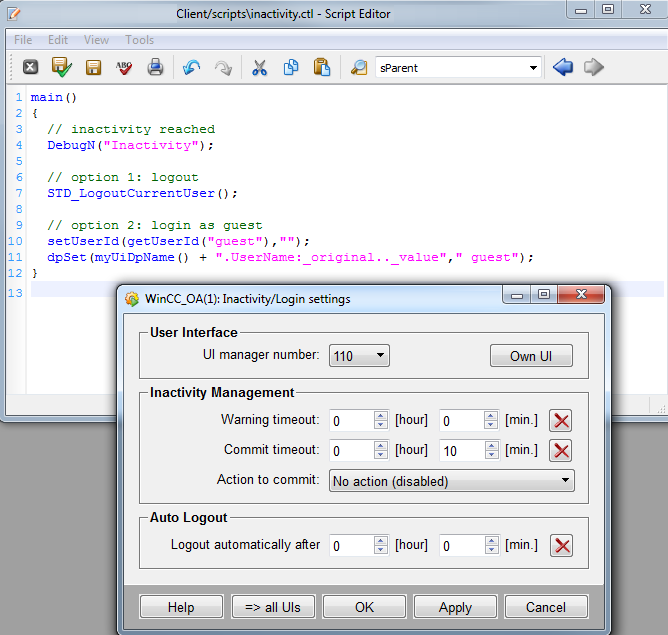
I came across the same issue with the login panel appearing, therefore wanted to share the solution I came up with.
In the inactivity settings set the Commit timeout to the timeout value you want for the timeout, set the "action to commit" to "No action (disabled)".
Create a script named "inactivity.ctl", in here you can place your code to logout the current user or login as guest, i.e.
main()
{
// inactivity reached
DebugTN("Inactivity");
// option 1: logout
STD_LogoutCurrentUser();
// option 2: login as guest
setUserId(getUserId("guest"),"");
dpSet(myUiDpName() + ".UserName:_original.._value"," guest");
}
Hope this helps.
- Attachments
-
- AMRPatricio
- Posts:61
- Joined: Mon Dec 12, 2016 4:43 pm
Re: AutoLogout
Thanks for sharing Chris!
Regards,
Antonio
Regards,
Antonio